Most "how to find dropshipping products" guides tell you to scroll through Amazon best-seller lists, copy anything that looks popular, and list it on eBay. It's slow, it's mostly guesswork, and by the time you find something, ten other sellers already found it too.
There's a faster, more reliable way: instead of hunting for products first, find sellers who are already succeeding at Amazon-to-eBay dropshipping, and reverse-engineer what's working for them. This is how experienced eBay dropshippers actually source — and it's the approach DropsFind is built around.
Why "seller-first" beats "product-first"
A seller who's been running an eBay store profitably for months has already done the hard part for you: they've tested demand, survived eBay's algorithm, and proven buyers will pay their prices. If you can find that seller and see what's actually selling for them right now, you skip weeks of trial and error.
The catch: manually checking a seller's active listings, cross-referencing each one against Amazon, and calculating whether the margin actually holds up after eBay and payment fees is tedious enough that almost nobody does it thoroughly. That's the exact gap DropsFind, an eBay product research tool built around sellers instead of generic best-seller lists, fills — and, as covered below, it's built to surface untapped products, not the same saturated ones every other tool already found.
Step 1: Find a seller worth analyzing
You have two options here, depending on whether you already have someone in mind.
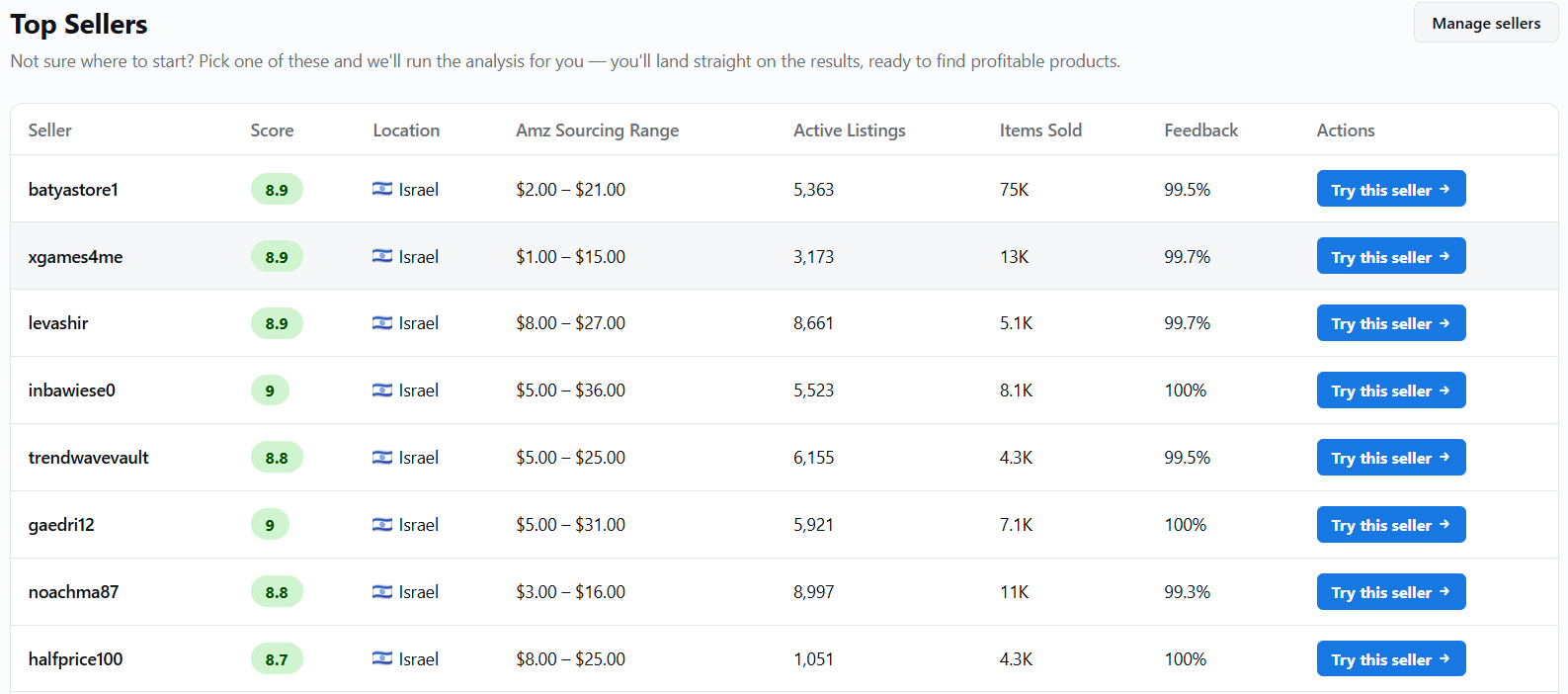
Don't know who to check yet? Open DropsFind's Top Sellers page. It's a hand-picked list of eBay sellers already confirmed to be running Amazon-to-eBay dropshipping operations — real store names, real performance scores, real sourcing price ranges. Click "Try this seller" on any of them and DropsFind runs the full analysis immediately, no typing required.
Already have a seller in mind? Look for the classic dropshipper signals on their eBay store: generic, keyword-stuffed titles rather than branded product photography, no consistent packaging or storefront branding, and a sell-through rate that's high relative to how new the listing looks. Paste their store URL (ebay.com/str/storename or ebay.com/usr/username) straight into DropsFind's search bar and click Analyze.
Step 2: Let the numbers do the filtering
Once a seller's loaded, DropsFind pulls their real listing data — feedback score, active and sold listing counts, and a computed performance score out of 10 — so you can tell at a glance whether this seller is actually worth sourcing from, before spending a single credit on the deeper scan.
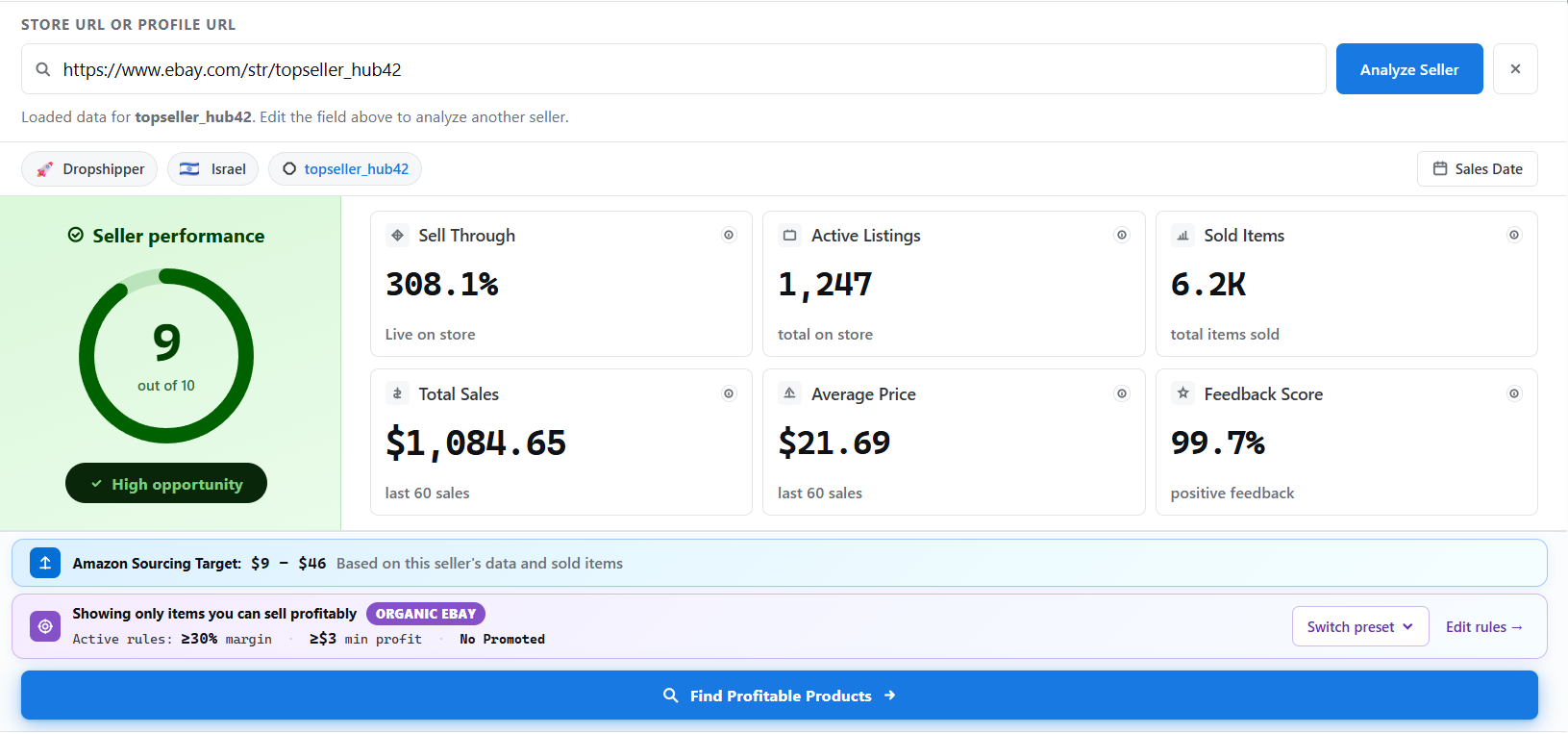
If they look promising, running Find Profitable Products cross-references every one of their eBay listings against Amazon, and only keeps the ones that clear your actual profit rules — minimum margin percentage and minimum dollar profit, calculated after eBay final value fees, payment processing, and (if the seller runs them) promoted listing fees. Nothing you have to calculate by hand.
What counts as a good score? Anything under 5/10 gets flagged as a low-opportunity seller — DropsFind will warn you before you spend a search credit on one, since low sell-through and thin recent sales mean the products it turns up are unlikely to clear your profit rules anyway. Treat 5/10 as a hard floor, not a target: sellers scoring 7+ with a healthy sell-through rate are the ones worth the deeper scan.
Step 3: Set your margin, not eBay's default
The two numbers that matter most here are minimum margin % and minimum profit $. A 12% margin might be fine on a $60 item and worthless on a $8 one — DropsFind lets you set both thresholds so low-dollar "profitable" listings that aren't actually worth the shipping hassle get filtered out automatically, not just anything that clears a single flat percentage.
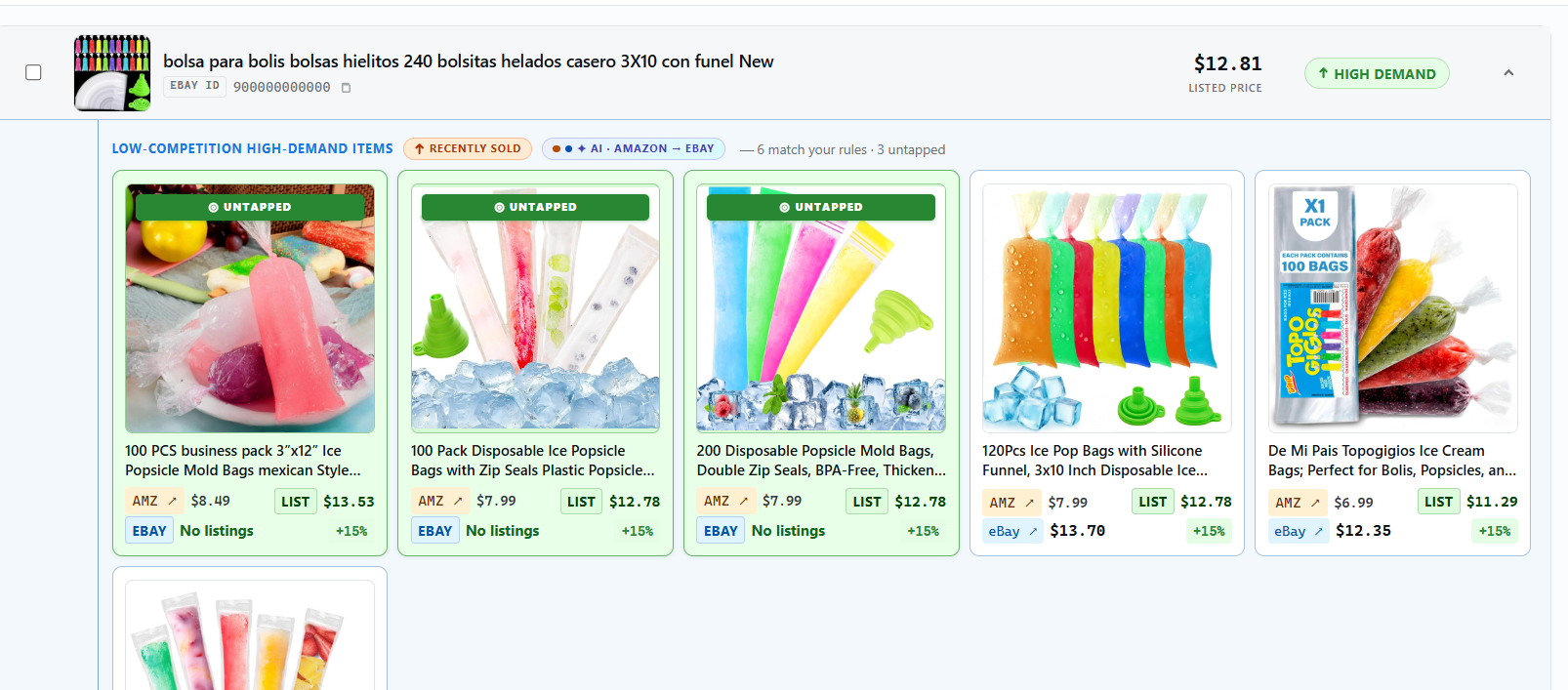
This is the actual output: real matched products, sourced price vs. listed price, and which ones are still "untapped" — not yet listed by other sellers doing the same research.
This is the real difference from most eBay research tools: the results aren't saturated products everyone else is already selling. A product only counts as untapped if DropsFind can't find a competing eBay listing for it at all — so what you get isn't the same items that already show up on every "trending" list, it's products with the same proven demand (the seller you analyzed is already selling that exact item on eBay) that no other dropshipper has listed yet.
Pricing rules: the fee math you'd otherwise do by hand
A margin that looks fine before fees can disappear entirely once you account for what eBay and your payment processor actually take. DropsFind's pricing rules bake all of that in automatically, so every margin and profit number you see already has real costs subtracted — not a rough estimate:
- eBay final value fee — the percentage eBay takes on the sale
- International fee — if the listing ships cross-border
- Promoted listings fee — only applied if you actually run promoted listings; toggle it off if you don't
- Payment processing — both the percentage cut and the flat per-transaction fee
Rather than re-entering these every time, you save them as a named rule (a preset) — set your minimum margin %, minimum profit $, and which fees apply once, then switch between rules per niche or reuse the same one across every seller you analyze. Change your numbers later and every future scan uses the update automatically.
DropsFind ships with two starting presets so you're not guessing at numbers on day one:
| Preset | Min margin | Min profit | Promoted listings |
|---|---|---|---|
| Organic eBay | 30% | $3 | Off |
| Promoted | 35% | $4 | 10% ad spend factored in |
The higher bar on the Promoted preset isn't arbitrary — it exists because promoted listings hand eBay another slice of the sale, so a product needs more margin left over to still be worth running ads on.
Title Optimizer: get titles eBay-ready before you list
Finding a profitable product is only half the job — if the title doesn't match how buyers actually search, it won't get impressions no matter how good the margin is. DropsFind's Title Optimizer takes a CSV of ASINs and titles, rewrites each one for eBay (keyword-optimized, trimmed to eBay's 80-character limit), and hands back a ready-to-upload CSV. It's the fastest way to clean up a batch of listings pulled straight from Amazon's often keyword-stuffed or oversized titles before they go live.
Common mistakes worth avoiding
- Chasing saturated products. If a product is on every "trending dropshipping items" list, assume dozens of other sellers found it the same way you did.
- Ignoring brand restrictions. Some brands actively enforce eBay's VeRO (Verified Rights Owner) program against unauthorized resellers — DropsFind flags listings that match known VeRO-protected brand names so you're not building a store around something that gets pulled.
- Sourcing from one seller only. Treat a good seller as a starting point, not the finish line — the same seller-first method applies to every store you find, so keep a short list rather than betting everything on one.
FAQ
Do I need spreadsheet or coding skills to use this? No. Pasting a seller's eBay store URL and clicking Analyze is the entire input required — DropsFind handles the Amazon cross-referencing, fee math, and filtering. The only spreadsheet involved is optional, for the Title Optimizer's CSV upload.
How is this different from just browsing Amazon best-seller lists? Best-seller lists show what's popular on Amazon, not what actually sells on eBay after fees, shipping, and competition. Seller-first sourcing starts from proof someone is already profitably reselling on eBay, then works backward to the matching Amazon products — so you're filtering by real eBay demand from the start, not guessing which popular item will translate.
What if I don't have a seller in mind yet? Use the Top Sellers page — it's a curated list of eBay sellers already confirmed to be running Amazon-to-eBay dropshipping, with the first five sellers open to every plan. Click any of them and DropsFind runs the full analysis immediately.
Does DropsFind check for brand or VeRO restrictions? Yes — matched products are flagged when they hit known VeRO-protected brand names, so you can rule them out before building a listing around something that's likely to get pulled.
Is there a free trial? Yes, 7 days, no credit card required, with full access to both the Top Sellers list and your own seller lookups.
Try it yourself
DropsFind's 7-day free trial (no credit card required) includes full access to both paths above — the curated Top Sellers list and unlimited seller lookups of your own. Start your free trial and run your first seller analysis in the next five minutes.